

Inboxes
What is an Inbox?
People are used to the traditional Gmail limitations — only having one inbox. That’s of the past.
An Inbox is now a fully loaded, programmatically accessible API resource re-designed for the scale of AI Agents.
Think of it as being similar to a Gmail or Outlook account, but built API-first. Each Inbox has a unique email address and serves as the primary resource your agent uses to send and receive emails, giving it a first-class identity on the internet.
Unlike traditional email providers that are designed for human scale, PostNuvia Inboxes are built to scale horizontally. You can create tens, hundreds, or even thousands of Inboxes for your agents on demand.
Psst! Rather than sending 1000 emails from 1 Inbox, sending 10 emails
across 100 Inboxes actually improves deliverability! Read more about
optimizing for deliverability here
The PostNuvia Hierarchy
As the diagram below illustrates, your organization is the top-level container that holds all your resources. You can provision many Inboxes within your organization, each with its own Threads, Messages, and Attachments, allowing you to manage a large fleet of agents seamlessly.
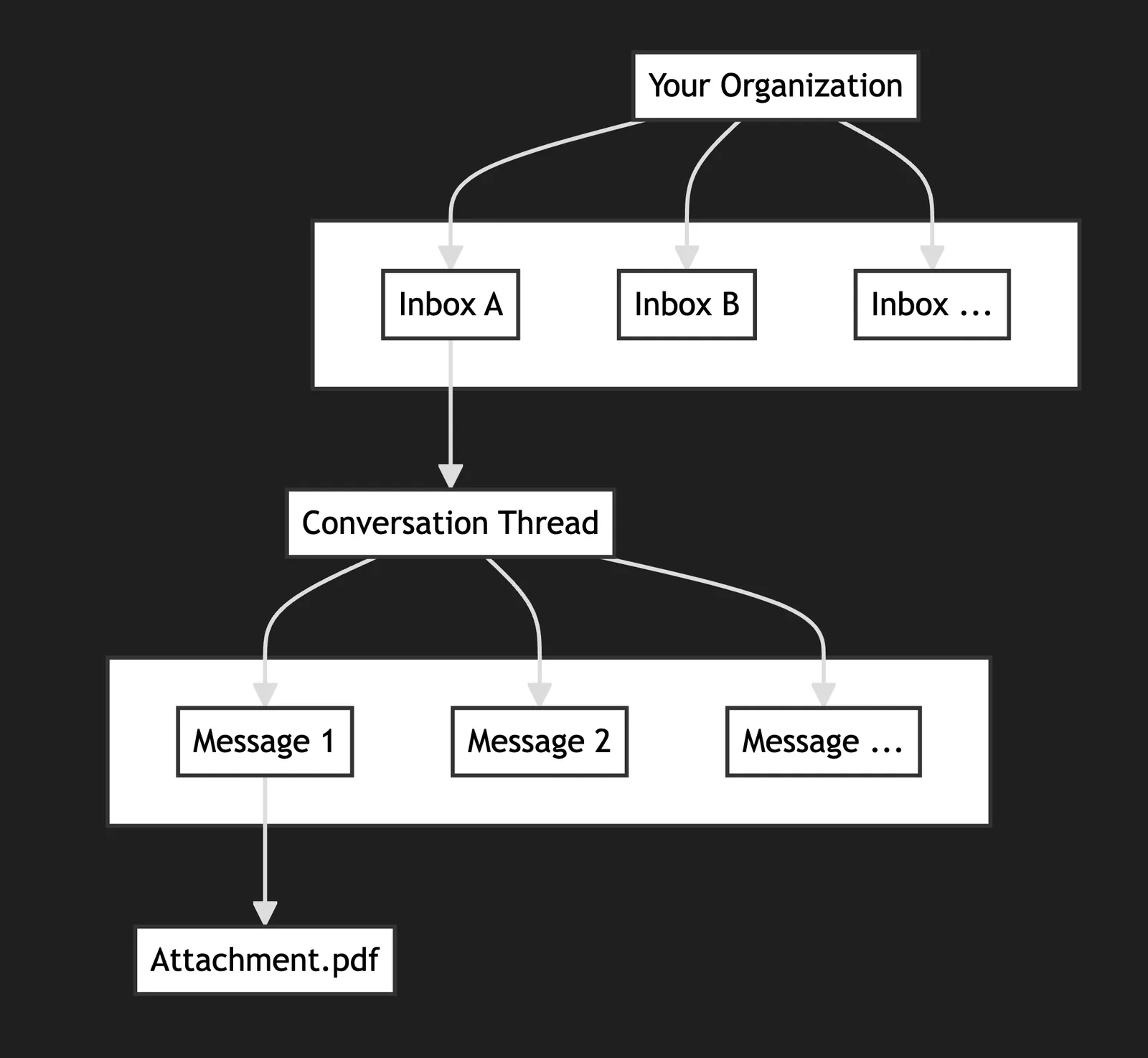
Organization
Your organization is the highest-level entity. It acts as a container for
all your Inboxes, Domains, and API keys, allowing you to manage
everything in one place.
Inbox
An Inbox is a single, scalable “email account” for your agent. You can
create thousands of Inboxes within your organization, each with its own
unique email address.
Thread
A Thread represents a single conversation. It groups together all replies
and forwards related to an initial email, keeping your interactions
organized.
Core Capabilities
Here at PostNuvia we’ve now made an Inbox an API resource, meaning you can perform standard CRUD operations on it. Here are the core capabilities you’ll use to manage your Inboxes.
When creating an Inbox, the username and domain are optional. If you
don’t provide them, PostNuvia will generate a unique address for you using our
default domain. You can also set domain to one of your verified custom
domains, or to any subdomain of a domain with subdomains
enabled. Check out our guide on managing
domains.
Profile pictures
The recipient’s email provider controls the picture displayed beside your emails. PostNuvia does not currently expose a profile-picture field; display_name changes the sender name only. See Inbox profile pictures for Google account photos, BIMI logos, and their requirements.
Metadata
Attach your own key-value data to any Inbox with the metadata field. Use it to link an inbox to records in your own system: a user ID, an agent name, or feature flags. Metadata is returned on every inbox response.
Values may be a string, number, or boolean. An Inbox can hold up to 256 keys, and each key and string value is limited to 256 characters.
Updating metadata
Updates merge into the inbox’s existing metadata — keys you include are added or overwritten, and keys you omit are preserved.
To remove a single key, send it with a null value. To clear all metadata at
once, send metadata as null. Every update must include at least one of
display_name, status, or metadata.
Pausing an inbox
Pause an inbox to stop it sending and receiving mail without deleting it. The address stays yours, and you can resume the inbox at any time. Pausing and resuming need the inbox_update permission.
Mail sent to a paused inbox is not delivered. It is not bounced, the sender is not told, and it is not delivered when you resume the inbox.
While an inbox is paused:
- Sending is blocked. Send, reply, forward, and sending a draft return
403with codeinbox_paused. A retry of a send that already completed before the pause, with the sameIdempotency-Key, still returns the original result; it sends nothing. - Scheduled drafts fail. A draft scheduled to send while the inbox is paused is not sent and its
send_statusbecomesfailed. Resuming the inbox does not retry it. - Incoming mail is not delivered, and no
message.receivedevent is sent for it. A message also addressed to other inboxes is still delivered to them. - AgentID sign-ins are refused for the inbox.
- Everything already in the inbox is kept. Its threads, messages, drafts, and API keys stay in place.
A paused inbox has status: "paused". Treat any other value, or no status field, as an inbox that sends and receives normally.
The current SDK releases do not accept status yet, so call the API directly:
To check whether an inbox is paused, read status from GET /v0/inboxes/{inbox_id}. If two requests change the status at once, one returns 409 with code race_condition: read the inbox again before retrying.
You can also create an inbox already paused by passing status: "paused" to create.
Inbox-scoped API keys
You can create API keys that are restricted to a single inbox. An inbox-scoped key can only access that inbox’s threads, messages, and drafts. This is useful when you want to give an agent or integration the minimum access it needs.
See the Multi-Tenancy guide for more on scoped keys.
Copy for Cursor / Claude
Copy one of the blocks below into Cursor or Claude for complete Inboxes API knowledge in one shot.